Hybrid Automation
Hybrid automation lets you pause an automated script, hand control to a human via a secure live URL, and resume automation once they finish. Use it for login flows, 2FA, CAPTCHAs, or any step that requires human judgment.
- A Browserless API token from your account dashboard
- Puppeteer or Playwright installed locally
Minting a LiveURL keeps the browser available for the requested LiveURL timeout, but it doesn't override the session's original timeout. The viewer still closes at the browser session's absolute maximum duration.
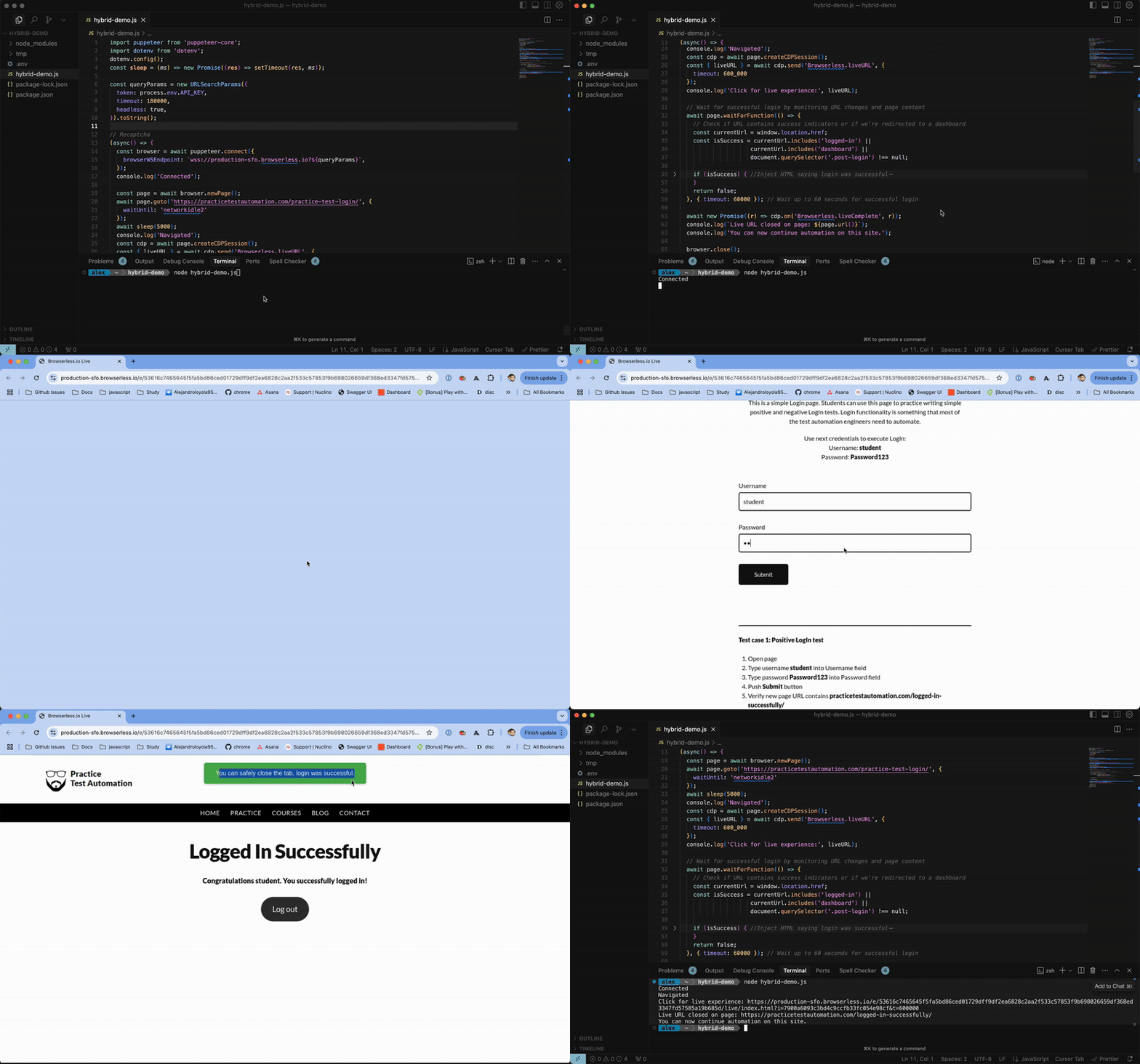
How It Works
Create a liveURL through CDP and Browserless returns a short-lived link that opens in a browser tab, with no API token embedded. You can also embed the Live URL in your app. For multi-stage workflows, read-only monitoring, and bandwidth optimization, see Advanced Hybrid Automation Configurations.
| Behavior | Default | Override |
|---|---|---|
| Viewport | Resizes to match the end user's screen | resizable: false to keep the current viewport |
| Interaction | Click, type, scroll, touch, and tap enabled | interactable: false to block all input (view-only mode) |
| Stream quality | Full quality compressed video | quality: 1-100 to reduce bandwidth (useful for mobile) |
| Tab scope | Only the page used to create the URL | showBrowserInterface: true to stream all tabs (may increase CAPTCHA challenges) |
| Events | None | Listen for Browserless.liveComplete and Browserless.captchaFound |
Basic Implementation
- Puppeteer
- Playwright
import puppeteer from 'puppeteer-core';

const browser = await puppeteer.connect({
  browserWSEndpoint: 'wss://production-sfo.browserless.io?token=YOUR_API_TOKEN_HERE',
});
const page = await browser.newPage();
await page.goto('https://practicetestautomation.com/practice-test-login/');

const cdp = await page.createCDPSession();
const { liveURL } = await cdp.send('Browserless.liveURL');

console.log('Share this URL:', liveURL);

// Wait for the user to complete their tasks
await new Promise((r) => cdp.on('Browserless.liveComplete', r));

// Continue automation...
await browser.close();
import { chromium } from 'playwright-core';

const browser = await chromium.connectOverCDP(
  'wss://production-sfo.browserless.io/chromium/stealth?token=YOUR_API_TOKEN_HERE'
);
const [context] = await browser.contexts();
const page = await context.newPage();
await page.goto('https://practicetestautomation.com/practice-test-login/');

const cdpSession = await context.newCDPSession(page);
const { liveURL } = await cdpSession.send('Browserless.liveURL');

console.log('Share this URL:', liveURL);

// Wait for the user to complete their tasks
await new Promise((r) => cdpSession.on('Browserless.liveComplete', r));

// Continue automation...
await browser.close();
Close LiveURL Programmatically
This script detects whether the user closed the LiveURL tab manually or if a specific selector appeared on the page, and then programmatically closes the LiveURL session.
- Puppeteer
- Playwright
import puppeteer from "puppeteer-core";

const browser = await puppeteer.connect({
  browserWSEndpoint: `wss://production-sfo.browserless.io?token=YOUR_API_TOKEN_HERE`,
});
const page = await browser.newPage();
await page.goto("https://practicetestautomation.com/practice-test-login/");

const cdp = await page.createCDPSession();
const { liveURL, liveURLId } = await cdp.send("Browserless.liveURL", {
  timeout: 120000,
});

console.log("Share this URL:", liveURL);

// Close when user finishes manually OR login succeeds
const result = await Promise.race([
  new Promise((r) => cdp.on("Browserless.liveComplete", () => r("user_closed"))),
  page.waitForSelector("h1.post-title", { timeout: 0 }).then(async () => {
    await cdp.send("Browserless.closeLiveURL", { liveURLId });
    return "login_detected";
  }),
]);

console.log(`LiveURL closed via: ${result}`);
await browser.close();
import { chromium } from "playwright-core";

const browser = await chromium.connectOverCDP(
  `wss://production-sfo.browserless.io?token=YOUR_API_TOKEN_HERE`
);
const [context] = browser.contexts();
const page = await context.newPage();
await page.goto("https://practicetestautomation.com/practice-test-login/");

const cdpSession = await context.newCDPSession(page);
const { liveURL, liveURLId } = await cdpSession.send("Browserless.liveURL", {
  timeout: 120000,
});

console.log("Share this URL:", liveURL);

// Close when user finishes manually OR login succeeds
const result = await Promise.race([
  new Promise((r) => cdpSession.on("Browserless.liveComplete", () => r("user_closed"))),
  page.waitForSelector("h1.post-title", { timeout: 0 }).then(async () => {
    await cdpSession.send("Browserless.closeLiveURL", { liveURLId });
    return "login_detected";
  }),
]);

console.log(`LiveURL closed via: ${result}`);
await browser.close();
Mint a Live URL for a running browser over HTTP
You can use this browser-management route to create a view-only Live URL for a browser you own:
curl -X POST \
  "https://production-sfo.browserless.io/browser/BROWSER_ID/live?token=YOUR_API_TOKEN_HERE"
{
  "liveURL": "https://production-sfo.browserless.io/live/index.html?i=...",
  "liveURLId": "..."
}
The route selects the focused page, shows the browser interface, and sets interactable: false. The URL lasts for up to 15 minutes, capped by the browser session's remaining lifetime. It returns 404 when the browser doesn't exist or is not accessible. See the POST /browser/{id}/live reference.
End-User Authentication
LiveURL links authenticate using a short-lived ?i=<id> parameter that is unique to the session. This ID expires automatically after the LiveURL timeout elapses or when Browserless.closeLiveURL is called. LiveURL paths do not require your API token. Do not embed your token in LiveURL links shared with end users.
After Browserless fills a stored credential, it immediately closes active Live URL streams and refuses new viewers or new Live URLs for that session. See the 1Password security model.
Network Endpoints & VPN/Proxy Tips
The LiveURL page loads over HTTPS and then upgrades a same-origin WebSocket to stream frames and input. When diagnosing corporate firewalls, VPNs, or upstream proxies, both of the URLs below must be reachable from the end user's browser:
| Surface | URL pattern | Protocol |
|---|---|---|
| LiveURL page | https://<your-browserless-host>/live/index.html?i=<id> | HTTPS |
| LiveURL stream | wss://<your-browserless-host>/live/<id> | WebSocket (WSS, TLS) |
For the Browserless-managed fleet, <your-browserless-host> resolves to production-sfo.browserless.io, production-lon.browserless.io, or production-ams.browserless.io depending on the region you connected to. Self-hosted Enterprise deployments use the same /live/* paths on whatever host they are deployed to.
If end users report an intermittent Couldn't establish a secure connection to the server. error on the LiveURL page:
- Allowlist WebSockets to
/live/*, not just HTTPS. Some VPNs and TLS-inspecting proxies pass HTTPS traffic but terminate WebSocket upgrades, which produces exactly this error. - Some VPN exit nodes interfere with specific regions. Switching VPN node/region – or routing LiveURL traffic directly – usually resolves it when the failure is tied to a particular upstream proxy.
- The server sends WebSocket pings every 30s to keep the connection alive through idle-timeout-sensitive middleboxes. After an initial connection failure or an established stream drops, the LiveURL page shows Reconnecting… and retries three times after 1, 2, and 4 seconds before showing a terminal error.
- Prefer a stable region close to the end user (
production-sfo,production-lon,production-ams) for the underlying Browserless connection. The LiveURL WSS runs on the same host, so a closer region reduces the number of hops where VPN/proxy interference can occur.
FAQ & Troubleshooting
How do I enable liveURL for my account or token?
There's nothing to enable. Call the liveURL BQL mutation or the Browserless.liveURL CDP command shown above.
Can a human interact with the session without writing code?
Yes, that's what the live URL is for. Request it with interactable: true and share the link; anyone who opens it can watch the browser and click, type, and scroll in it directly, with no code or Browserless account needed. Useful for hand-completing logins or reviewing what an automation is doing.
Why was a viewer rejected with 429?
Each Live URL accepts five concurrent viewers. Close an existing viewer before connecting another one. Reloads and reconnects can briefly overlap, so wait for the old connection to close before retrying.
Why didn't Browserless.liveComplete fire?
Register the listener on the same CDP session before sharing the URL. The event fires when an opened viewer disconnects, its timeout expires, Browserless.closeLiveURL closes it, or credential protection tears it down. A URL that nobody opens has no viewer to complete, so wrap your wait in an application timeout.
Why am I getting a 403 Forbidden error?
Your API token is missing or expired. Pass it as a ?token= query parameter in the WebSocket or HTTP URL. Verify the token in your account dashboard.
My script works locally but fails on Browserless
Local browser settings may differ from the Browserless environment. Use launch parameters to match your local setup (viewport, user agent, timezone). See launch parameters for the full list.