Quickstart
Follow these steps to run your first BrowserQL query:
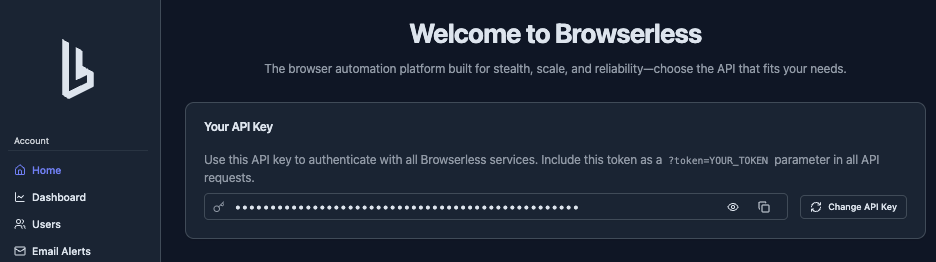
Get Your API Token
- Go to the Browserless dashboard
- Sign up or log in to your account
- Copy your API token from the dashboard
Access IDE
Access the BQL web editor. Learn more about using the IDE.
Run Your First Query
Copy and paste this example query into the IDE to scrape the first headline from Hacker News, and click play:
mutation ScrapeHN {
  goto(url: "https://news.ycombinator.com", waitUntil: firstMeaningfulPaint) {
    status
    time
  }
  firstHeadline: text(selector: ".titleline") {
    text
  }
}
Click Run in the IDE to execute this query.
Here's what each part does:
mutationnames the script and defines it as a browser actiongotonavigates to the URL and waits forfirstMeaningfulPaintto firestatusandtimeare returned once the wait condition is metfirstHeadlineis an alias for thetextactiontext(selector)extracts the text content of the matched element
Response
{
"data": {
"viewport": {
  "width": 1366,
  "height": 768,
  "time": 2
},
"goto": {
  "status": 200,
  "time": 1467
},
"firstHeadline": {
  "text": "Browserless is awesome! (https://github.com/browserless)"
}
}
}
New to GraphQL? The Language Basics page covers the key concepts.
Exporting Your Query
Once you've written a query in the IDE, you can export it to run programmatically from your own code, in whatever language you use. Here's what the Hacker News example looks like as an HTTP request:
- cURL
- Axios
- Fetch
curl --request POST \
  --url 'https://production-sfo.browserless.io/chromium/bql?token=YOUR_API_TOKEN_HERE' \
  --header 'Content-Type: application/json' \
  --data '{"query":"mutation ScrapeHN {\n  goto(url: \"https://news.ycombinator.com\", waitUntil: firstMeaningfulPaint) {\n    status\n    time\n  }\n  firstHeadline: text(selector: \".titleline\") {\n    text\n  }\n}"}'
import axios from 'axios';

const response = await axios.post(
  'https://production-sfo.browserless.io/chromium/bql?token=YOUR_API_TOKEN_HERE',
  {
    query: `mutation ScrapeHN {
  goto(url: "https://news.ycombinator.com", waitUntil: firstMeaningfulPaint) {
    status
    time
  }
  firstHeadline: text(selector: ".titleline") {
    text
  }
}`,
  },
  { headers: { 'Content-Type': 'application/json' } }
);

console.log(response.data);
const response = await fetch(
  'https://production-sfo.browserless.io/chromium/bql?token=YOUR_API_TOKEN_HERE',
  {
    method: 'POST',
    headers: { 'Content-Type': 'application/json' },
    body: JSON.stringify({
      query: `mutation ScrapeHN {
  goto(url: "https://news.ycombinator.com", waitUntil: firstMeaningfulPaint) {
    status
    time
  }
  firstHeadline: text(selector: ".titleline") {
    text
  }
}`,
    }),
  }
);

const data = await response.json();
console.log(data);
The IDE can generate these export snippets for you automatically. Learn how to export and use queries in your code.
Using the BAP TypeScript SDK
For a Puppeteer-like TypeScript API, install the official Browser Automation Protocol (BAP) SDK:
npm install @browserless.io/bap-ts
The same Hacker News flow becomes a sequence of strongly typed methods:
import Browserless from "@browserless.io/bap-ts";

const TOKEN = "YOUR_API_TOKEN_HERE";

const browser = Browserless.connect({
  browserWSEndpoint: "wss://production-sfo.browserless.io/chromium/bql",
  token: TOKEN,
});

const page = await browser.newPage();

// The same wait condition as the `goto` mutation above.
await page.goto("https://news.ycombinator.com", {
  waitUntil: "firstMeaningfulPaint",
});

const firstHeadline = await page.text({ selector: ".titleline" });
console.log(firstHeadline.text);

await browser.close();
Response
Browserless is awesome! (https://github.com/browserless)
Each method builds the same BQL mutation you wrote in the IDE and sends it over one WebSocket, so the results match. See the BAP Quickstart for setup details and the generated Page reference for every available operation.
FAQ & Troubleshooting
What do I need to get started with BrowserQL?
A Browserless API token from a free account at browserless.io. No local browser installation is required. BQL runs entirely in the cloud.
My query returns a connection error
Verify your API token is valid and your plan is active in the dashboard. Check that you're using the correct endpoint URL format: wss://production-sfo.browserless.io/chromium/bql?token=YOUR_TOKEN.
Can I hand off a BQL session to Puppeteer or Playwright?
Yes. Use the reconnect mutation to get a WebSocket endpoint you can pass to Puppeteer or Playwright. See Puppeteer & Playwright handoff.