Unit consumption
Every Browserless Cloud plan includes a monthly unit allowance. Units are the billing currency for all activity on the platform, and browser sessions, proxy traffic, and CAPTCHA solving each draw from the same balance.
What consumes units
Browser time
Browser time is billed in 30-second increments. Every 30 seconds a browser session is open consumes 1 unit. Partial increments are rounded up, so a session open for 31 seconds consumes 2 units. This applies to all connection methods: BrowserQL, BaaS (Puppeteer/Playwright), and REST APIs.
A session that runs for 45 seconds consumes 2 units, regardless of whether the browser is actively navigating or sitting idle. Close sessions as soon as you're done to avoid unnecessary consumption.
Set a custom timeout on your connections to prevent runaway sessions from draining your balance. The default timeout is 30 seconds.
Proxy traffic
Built-in residential and datacenter proxies consume units based on bandwidth:
| Proxy type | Cost |
|---|---|
| Residential | 6 units per MB |
| Datacenter | 2 units per MB |
Proxy units are charged on top of browser time. A 30-second session using a residential proxy that transfers 2 MB of data costs 1 (browser time) + 12 (proxy) = 13 units.
Third-party proxies connected through --proxy-server launch args don't consume proxy units. Only Browserless's built-in proxies are metered.
For more details, see the Proxies documentation.
CAPTCHA solving
Each successful CAPTCHA solve costs 10 units. Attempts that don't clear the challenge aren't charged. This covers the cost of the third-party solving service.
Using stealth mode and residential proxies reduces how often CAPTCHAs appear, which in turn reduces unit spend on solving.
Summary
| Activity | Unit cost |
|---|---|
| Browser session time | 1 unit/30 seconds |
| Residential proxy traffic | 6 units/MB |
| Datacenter proxy traffic | 2 units/MB |
| Successful CAPTCHA solve | 10 units/solve |
MCP session cost
When an AI agent uses the Browserless MCP Server, each tool call opens a browser session that consumes units. The longer a session stays open, the more browser-time units it uses. Proxy traffic and CAPTCHA solving add units on top of browser time.
The MCP Server exposes two types of tools:
Stateful tool — browserless_agent drives a persistent browser session across multiple turns.
Stateless tools — each call opens a browser, performs one action, and closes. See the full list of available tools in the MCP Server documentation.
Check my consumption
Account dashboard
The Cloud Subscription card on your account dashboard shows your current billing cycle usage at a glance: units consumed, total allowance, concurrency limit, and cycle reset date.
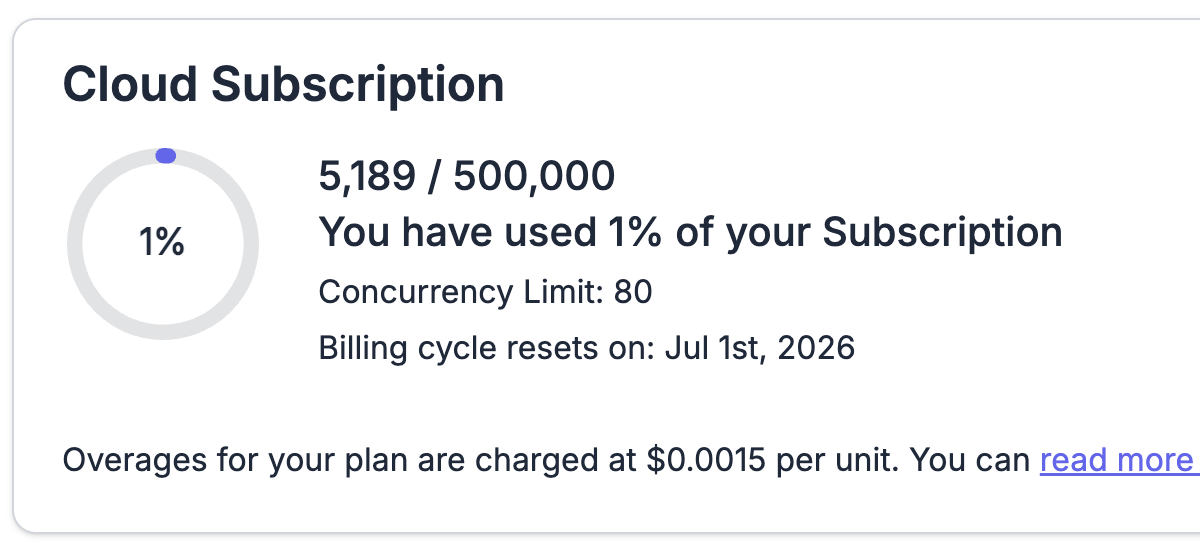
The dashboard also provides interactive charts with hour, day, and week aggregation so you can spot usage trends over time.
The dashboard also includes a download icon () that opens a popup where you can select a timeframe and export your session and unit-consumption data as a CSV or JSON file.
Usage API
You can fetch your current consumption programmatically:
- cURL
- JavaScript
- Python
curl --location "https://api.browserless.io/v1/account/usage?token=YOUR_API_TOKEN"
const TOKEN = "YOUR_API_TOKEN_HERE";

const response = await fetch(
  `https://api.browserless.io/v1/account/usage?token=${TOKEN}`
);
const usage = await response.json();
console.log(usage);
import requests

TOKEN = "YOUR_API_TOKEN_HERE"

response = requests.get(
    f"https://api.browserless.io/v1/account/usage?token={TOKEN}"
)
print(response.json())
This is useful for building your own monitoring dashboards or setting up alerts when consumption approaches your plan limit.
FAQ & Troubleshooting
Are units consumed on failed requests (HTTP 5xx)?
Units meter browser time actually used, so it depends on when the failure happens. A request rejected before a browser starts (for example a 429 from a full queue or a validation error) consumes nothing. A request that fails mid-run still consumes the browser time used up to the failure, plus any proxy bandwidth already transferred.
Do individual endpoints like /pdf have their own price?
No. REST endpoints, BaaS connections, and BrowserQL all meter the same way: browser session time in 30-second increments, plus proxy bandwidth and CAPTCHA solves if you use them. A /pdf call that finishes in under 30 seconds costs 1 unit.
Do multiple tabs multiply unit consumption?
No. Units meter how long the browser session is open, not how many tabs or pages it has. Opening several tabs inside one session costs the same as one tab for the same duration, though more tabs usually means the session stays open longer.
Are there hourly or daily unit limits?
No. Units are a monthly allowance. The per-plan limits that apply moment to moment are concurrency (how many browsers can run at once) and session time; see your plan details for those caps.